
Reversal handling
A reversal is an approved transaction that is voided right before the response is delivered to the terminal, due to a communication interruption between the NetPay server and the terminal that causes a status mismatch. In other words, the NetPay server manages to approve the transaction, but the terminal never learns that the transaction was approved because of the communication loss, so the terminal will return a communication error.
In production, you will have access to a NetPay web portal that displays transaction statuses in near real time. However, it is very important to always give priority to what the terminal shows on screen and on the printed ticket, since card-present transactions depend heavily on the hardware where the operation was performed. As a result, consuming NetPay APIs / web platforms such as Manager, or other alternatives outside the terminal, may show status inconsistencies for reversals, due to the nature of the situation that cuts off a transaction's communication and prevents it from completing successfully.
What causes a transaction to be reversed on the NetPay terminal?
Below are the ways in which a communication problem and a possible reversal can occur.
1.- Removing the card during payment processing, specifically on the "Esperando Autorización" (Waiting for Authorization) screen shown right after the PIN is entered.
2.- Intermittent or unstable internet connection.
3.- Isolated and uncommon scenarios that cause an interruption at the exact moment the transaction is being processed.
How should reversals of transactions performed on the NetPay terminal be handled?
Currently, NetPay, through the Smart PinPad application that handles card-present payment processing on the terminal, handles reversals as follows:
1.- If there are slight interruptions in the internet connection, or the card is removed during the transaction process, Smart PinPad version 2.6 internally performs 3 retries to reverse the transaction automatically. The terminal will still show an error on screen; however, in the Manager web portal the transaction will appear with the status "Reversada" (Reversed).
This automatic reversal process should be enough to confirm that the transaction was closed and will not be approved or charged to the customer due to the communication loss that interrupted the transaction.
Automatic reversals are performed internally by NetPay when slight internet interruptions occur, and when the card is moved or removed during payment processing, which are the most common situations. Smart PinPad 2.6 internally performs 3 retries to reverse the transaction at that same moment; however, if these 3 retries fail, point #2 must be followed.
2.- If the internet connection is completely unstable and the bandwidth is below the recommended level (3 Mbps to 5 Mbps upload and download), the 3 Smart PinPad 2.6 retries may not succeed. This means reversals must be handled manually; that is, a subsequent transaction of at least 1 cent must be performed with any card so that the previous transaction with the communication problem is reversed.
It is very important to handle this second point (manual reversal) correctly, since if a subsequent transaction of at least 1 cent is not performed with any card, the previous transaction with the communication problem may not be reversed, and the customer may leave with the service or product without being charged.
How can a possible reversal be identified from the NetPay terminal?
With the context of the points above, below is an example of how Smart PinPad displays this type of situation on screen when a communication interruption occurs: the NetPay server manages to approve the transaction, but the terminal does not learn about it because the card was removed too early during the payment process, or because internet interruptions affected the transaction flow.
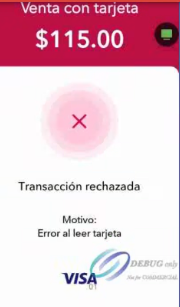
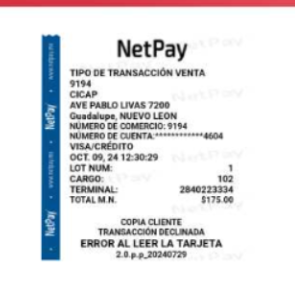
The official NetPay ticket may show messages such as "ERROR AL LEER LA TARJETA" (Error reading card) or "ERROR DE CONEXIÓN" (Connection error), and the JSON response that the terminal delivers to the merchant's integrated point of sale or application looks as follows:
Message change between versionsPreviously, with earlier versions of Smart PinPad, this scenario returned the message
"SIN COMUNICACIÓN"(No communication). Starting with Smart PinPad 2.6 + DLL 1.9.2, the message shown for this reversal scenario is"Error al leer tarjeta"(Error reading card), and most response fields come back empty or null, since the transaction did not complete processing. It is possible that"SIN COMUNICACIÓN"may still appear in other types of errors unrelated to reversals.
{
  "data": {
    "affiliation": "9194",
    "amount": "0.00",
    "bankName": "",
    "bin": "",
    "cardType": "",
    "cardNumber": "",
    "cardTypeName": "",
    "cityName": "Guadalupe NUEVO LEON",
    "responseCode": "05",
    "folioNumber": "2-5650-1781118562363",
    "isReprint": false,
    "message": "Error al leer tarjeta",
    "moduleCharge": "0",
    "moduleLote": "2",
    "terminalId": "2841260371",
    "rePrintDate": "2.6.0.1.p.p_20260304",
    "rrnNumber": "",
    "storeId": "9194",
    "streetName": "AVE PABLO LIVAS 7200",
    "ticketDate": "JUN. 10, 26 13:10:16 ",
    "transType": "",
    "transactionId": null,
    "storeName": null,
    "reprintModule": null,
    "applicationLabel": null,
    "customerName": null,
    "preAuth": null,
    "transDate": null,
    "authCode": null,
    "tipLessAmount": null,
    "tipAmount": null,
    "aid": null,
    "arqc": null,
    "cardExpDate": null,
    "orderId": null,
    "promotion": null,
    "rePrintMark": null,
    "hexSign": null,
    "transactionCertificate": null,
    "preStatus": 0,
    "isQPS": 0,
    "hasPin": false,
    "cardOrigin": null
  },
  "idReport": -1,
  "applyCashback": false
}
This JSON corresponds to the immediate response of the sale attempt, not to a reprintThat is why the
reprintModulefield isnull: the final status of the transaction has not yet been queried through a reprint by folio. This is only the moment the communication loss is detected; it does not confirm whether the reversal has already been completed or is still pending. Note also thatidReport: -1and fields such astransactionId,orderIdandrrnNumbercome back empty or null, reflecting that the transaction was not fully generated on the terminal side.
Relationship between a reversal and reprint by folio
The error message shown on screen at the moment of the interruption only indicates that a communication problem occurred; it does not indicate whether the reversal has already been completed or is still pending. To confirm the actual, final status of the transaction, it is essential to query it through a reprint by folio, validating the reprintModule field:
| Situation | Expected result in reprintModule |
|---|---|
| Automatic reversal completed successfully (point #1) | RV — Reversed transaction |
| Automatic retries failed, manual reversal pending (point #2) | PRV — Transaction pending reversal |
Seeing the error message on screen is not enough to consider a transaction closedThe final status must be confirmed through a reprint by folio. If the result is
PRV, the manual reversal (1-cent sale) described in point #2 must be performed to avoid charging the customer for a transaction that was not actually completed.
Updated 8 days ago